Client-Side Tracking with Google Tag Manager
How does it work?
When a user clicks on one of your products on moebel.de, meubles.fr, meubelo.nl, moebel24.at, moebel24.ch, mobi24.es, mobi24.it, living24.pl or living24.uk, our server generates a unique clickID (moeclid) which is appended as a query parameter to your landing page URL. With the integration of our client-side script, the clickID is written into the local storage for 90 days. Our server does not get any requests from you unless the user converts.
If the user makes a purchase on your site and has an existing moeclid value in the local storage of the browser, a conversion event is sent to our server including the clickID and further purchase-related data.
Prerequisites
Before you proceed with this integration, make sure the following conditions are met:
-
You have received your Partner ID or dedicated Sales Tracking Key.
-
You have set up a Google Tag Manager web container.
-
You have configured GA4 ecommerce tracking, so that a purchase event (by default
purchase) with its ecommerce data reaches the data layer. -
You have told your account manager whether you report gross values (including tax) or net values, so that we can handle the tax correctly.
Integration
The client-side sales tracking for Google Tag Manager consists of two tags: the base code tag and the conversion tag.
1. Base Code
The base code tag writes the appended moeclid parameter value of the landing page URL into the local storage of the browser. The trigger of this tag is configured in a way that the tag only fires if the user reached your site through one of our portals. It doesn’t affect your traffic from other marketing channels.
-
Add a new tag and select
Custom HTMLas tag type -
Copy the code snippet of the initialization script below and paste it. It is the same for all portals.
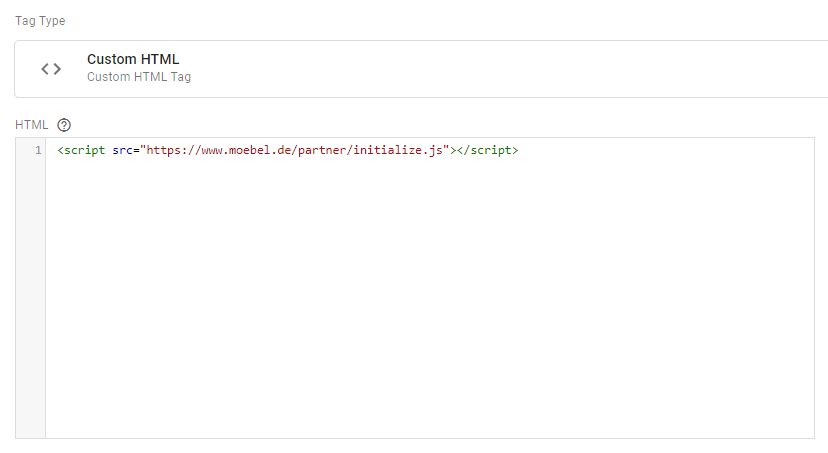
<script>
"use strict";

!function(){"use strict";var t,i,e,n;JSON.parse({}.VITE_ENDPOINTS||"{}"),(n=(t=window.location.search.replace("?","").split("&").find((function(t){return t.startsWith("moeclid")})))&&t.split("=")[1]||null)&&(i=n,e={date:(new Date).toISOString(),clickId:i},localStorage.setItem("MOEBEL_CLICKOUT_ID",JSON.stringify(e)))}();
</script>-
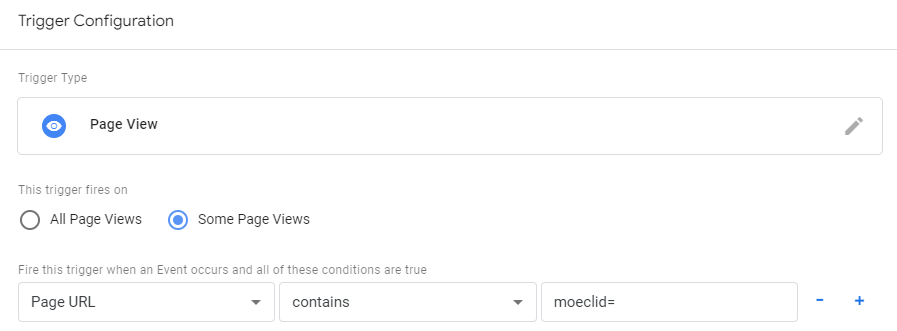
Create a new
Page Viewtrigger where the URL of the page containsmoeclid=. This way, the base code tag only fires when a user reached your site through a product click on one of our portals.
-
Add the trigger to the tag and save the tag.
| Since local storage cannot be shared across domains/subdomains, saving the clickID (moeclid) to use at checkout will not work if the actual checkout page is on a different domain/subdomain than the product page the user was sent from us. |
2. Conversion
The conversion tag enables sending us a purchase event at the time the user converts. If there is no clickID from the initialization script in the local storage of the browser, calling the sale function does nothing. Moreover, this script removes obsolete clickIDs (older than 90 days) from local storage.
-
Add a new tag and select
Custom HTMLas tag type -
Copy the code snippet of the conversion script and paste it. Please be aware that the
MARKETvariable in the script must be adjusted for your market. (moebel.de - de, meubles.fr - fr, meubelo.nl - nl, moebel24.at - at, moebel24.ch - ch, mobi24.es - es, mobi24.it - it, living24.pl - pl, living24.uk - gb)
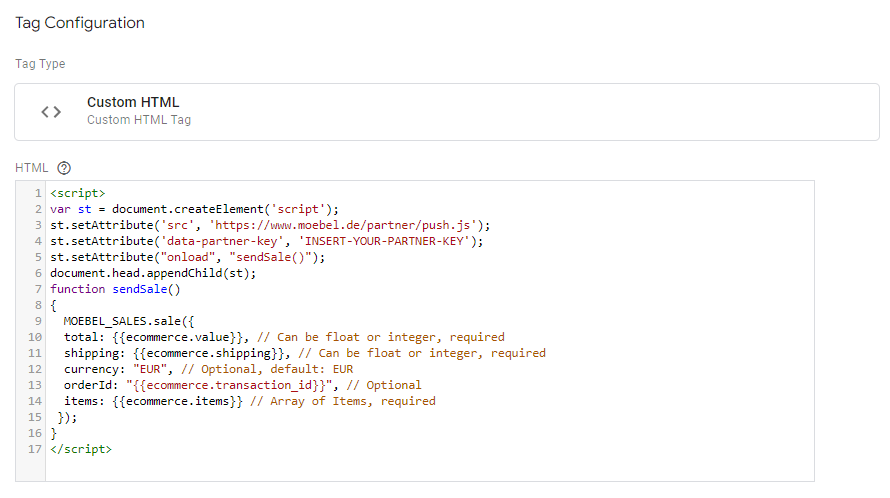
The screenshot shows the layout of the tag with the compiled code shortened. Copy the complete script below.
<script>
"use strict";
var PARTNER_KEY = "INSERT-YOUR-PARTNER-KEY";  // REPLACE ME
var MARKET = "de"; // REPLACE ME "de","fr","nl","at","ch","es","it","pl","gb"

!function(){"use strict";var e="MOEBEL_CLICKOUT_ID",r=JSON.parse('{"at":"https://redirect.moebel24.at/api/1.0/moebel/at/sales","ch":"https://redirect.moebel24.ch/api/1.0/moebel/ch/sales","de":"https://redirect.moebel.de/api/1.0/moebel/de/sales","fr":"https://redirect.meubles.fr/api/1.0/moebel/fr/sales","nl":"https://redirect.meubelo.nl/api/1.0/moebel/nl/sales","es":"https://redirect.mobi24.es/api/1.0/moebel/es/sales","it":"https://redirect.mobi24.it/api/1.0/moebel/it/sales","pl":"https://redirect.living24.pl/api/1.0/moebel/pl/sales","gb":"https://redirect.living24.uk/api/1.0/moebel/gb/sales"}');function t(e){return isNaN(e)||!isFinite(e)?new Error("Bad numeric value "+e):null}function n(e){return t(e)?t(e):Number.isInteger(e)?null:new Error("Bad integer value "+e)}function o(e){switch(typeof e){case"number":return t(e)||e;case"string":return t(parseFloat(e))||parseFloat(e);default:return new Error("Can not convert "+typeof e+" to number (float)")}}function i(e){switch(typeof e){case"string":return e;case"number":return t(e)||e.toString();default:return new Error("Can not convert "+typeof e+" to string")}}function s(e){return e&&Array.isArray(e)&&0!==e.length?!e.some((function(e){return!function(e){if(!e)return console.error("Sales object item "+e+" should be object instead"),!1;if(Object.keys(e).filter((function(e){return"category"===e||"item_category"===e})).map((function(r){return e[r]})).filter((function(e){return"string"!=typeof e})).length)return console.error("item.category OR item.item_category must be a string if present"),!1;var r=e.category||e.item_category||"";if(Object.keys(e).find((function(e){return"category"===e||"item_category"===e}))&&"string"!=typeof r)return console.error("Sales object item "+JSON.stringify(e)+" item.category OR item.item_category is missing"),!1;var t=e.item_id||e.id;return!t||"string"!=typeof t&&o(t)instanceof Error?(console.error("Sales object item "+JSON.stringify(e)+" is missing item.id OR item.item_id field, or it is not a non-empty string/number"),!1):Number.isInteger(e.quantity)?!(Number.isNaN(e.price)||!Number.isFinite(e.price))||(console.error("Sales object item price for item "+JSON.stringify(e)+" is not a number"),!1):(console.error("Sales object item quantity for item "+JSON.stringify(e)+" is not an integer number"),!1)}(e)})):(console.error("Items must be a non-empty array, got "+JSON.stringify(e)+" instead"),!1)}function a(){return a=Object.assign?Object.assign.bind():function(e){for(var r=1;r<arguments.length;r++){var t=arguments[r];for(var n in t)({}).hasOwnProperty.call(t,n)&&(e[n]=t[n])}return e},a.apply(null,arguments)}function c(e){var r=a({},e),t=o(e.price);t instanceof Error&&console.error("Item price conversion error: "+t.message),r.price=t;var s=function(e){switch(typeof e){case"number":return n(e)||e;case"string":return n(parseFloat(e))||parseInt(e,10);default:return new Error("Can not convert "+typeof e+" to number (float)")}}(e.quantity);if(s instanceof Error&&console.error("Item quantity conversion error: "+s.message),r.quantity=s,-1===Object.keys(e).indexOf("item_category")&&-1===Object.keys(e).indexOf("category")||(delete r.item_category,r.category=-1!==Object.keys(e).indexOf("item_category")?e.item_category:e.category),e.id){var c=i(e.id);if(c instanceof Error)return console.error("Item id can not be converted to string: "+c.message),c;r.id=c}if(e.item_id){var u=i(e.item_id);if(u instanceof Error)return console.error("Item item_id can not be converted to string: "+u.message),u;r.id=u}return r}function u(){return u=Object.assign?Object.assign.bind():function(e){for(var r=1;r<arguments.length;r++){var t=arguments[r];for(var n in t)({}).hasOwnProperty.call(t,n)&&(e[n]=t[n])}return e},u.apply(null,arguments)}function l(e){console.error("Received sales object: "+JSON.stringify(e))}function f(t,n){if(!t)return console.error("No sales object provided"),void l(t);var f,m=function(e){try{for(var r=a({},e),t=0,n=["total","shipping"];t<n.length;t++){var s=n[t],u=o(e[s]);if(u instanceof Error)return console.error("Can not convert "+s+" to number "+u.message),u;r[s]=u}if(r.orderId){var l=i(e.orderId);if(l instanceof Error)return console.error("Can not convert orderId to string "+l.message),l;r.orderId=l}if(e.items&&Array.isArray(e.items)){var f=e.items.map(c),m=f.find((function(e){return e instanceof Error}));if(m)return console.error("Can not convert items: "+m.message),m;r.items=f}return r}catch(d){return d}}(t);if(m instanceof Error)return console.error("Error sanitizing sale "+m.message),void l(t);if(function(e){if(!e)return console.error("No sales object provided to the API"),!1;if(!s(e.items))return!1;if(e.hasOwnProperty("currency")&&"string"!=typeof e.currency)return console.error("Currency shold be string"),!1;for(var r=0,t=["total","shipping"];r<t.length;r++){var n=t[r];if(Number.isNaN(e[n])||!Number.isFinite(e[n]))return console.error("Sales object "+n+" does not exist or is not a number"),!1}return!0}(f=m)){var d=function(){var r=localStorage.getItem(e);if(!r)return null;try{var t=JSON.parse(r);if(null==t||!t.clickId||null==t||!t.date||Number.isNaN(new Date(null==t?void 0:t.date).getTime()))return console.error("Click id has corrupted data"),null;var n=new Date(t.date),o=new Date;return n.getTime()+7776e6<o.getTime()?(console.log("Deleting expired click id"),localStorage.removeItem(e),null):t}catch(i){return console.error(i),null}}();if(d){var g=[];return n.partnerKeys.forEach((function(e){n.useMarkets.forEach((function(t){return g.push(function(e,t,n){var o=r[e];return fetch(o+"?key="+n,{method:"POST",headers:{"Content-type":"application/json"},mode:"no-cors",body:JSON.stringify(t)}).catch((function(e){console.error("Error submitting sale to API: "+e.message)}))}(t,function(e,r){var t={currency:e.currency||"EUR",items:e.items.map((function(e){var r=e.category,t=e.id,n=e.item_id,o=e.item_category;return u({item_id:t||n,price:e.price,quantity:e.quantity},r||o||""===r||""===o?{item_category:r||o||""}:{})})),moeclid:r,value:e.total,shipping:e.shipping,type:"c2s"};return e.orderId&&(t.order_id=e.orderId),t}(f,d.clickId),e))}))})),g}}else l(t)}var m=function(){return function(e){var t;try{t=function(){var e=window,t=e.PARTNER_KEY;if(!t)throw new Error("PARTNER_KEY not defined on window object");var n=e.MARKET;if(!n)throw new Error("MARKET not defined on window object");var o=Array.isArray(t)?t:(""+t).replace(/ /g,"").split(","),i=Array.isArray(n)?n.map((function(e){return(""+e).toLowerCase()})):(""+n).replace(/ /g,"").toLowerCase().split(",");return i.forEach((function(e){if(-1===Object.keys(r).indexOf(e))throw new Error("Unsupported market value: "+e)})),{partnerKeys:o,useMarkets:i}}()}catch(n){return void console.error(n)}return f(e,t)}};window.PARTNER_KEY?function(e,r,t){void 0===t&&(t="MOEBEL_SALES");var n={sale:m()};e[t]=n}(window):console.error("Can not define moebel clickout API - PARTNER_KEY missing")}();

MOEBEL_SALES.sale({
    total: {{ecommerce.value}}, // Can be float or integer, required
    shipping: {{ecommerce.shipping}}, // Can be float or integer, required
    currency: "EUR", // Optional, default: EUR - set the currency of your prices
    orderId: {{ecommerce.transaction_id}}, // Optional, recommended: unique per order
    items: {{ecommerce.items}} // Array of Items, required
  });
</script>-
Enter your partner key in line 3, exactly as provided by your account manager.
-
Enter your market in line 4:
de,fr,nl,at,ch,es,it,plorgb. -
Create variables of the type
Data Layer Variable(Version 2) namedecommerce.value,ecommerce.shipping,ecommerce.itemsandecommerce.transaction_idwith the same data layer paths, unless they already exist. TheMOEBEL_SALES.sale()call in the script uses them.
The table below describes the parameters and provides example values:
| Parameter | Description | Mandatory Field | Data Type | Example | Comment |
|---|---|---|---|---|---|
total |
total basket value, without shipping costs, gross or net as agreed with your account manager |
yes |
float |
1499.97 |
2 digits, "." as decimal delimiter, no thousand delimiters |
shipping |
shipping costs |
yes |
float |
29.99 |
2 digits, "." as decimal delimiter, no thousand delimiters |
items |
array of unique items in order. elements: - - - - |
yes |
array |
[{ "item_id": "47886359", "quantity": 1, "price": 899.99, "item_category": "boxspringbetten" }, { "item_id": "31118801", "quantity": 2, "price": 299.99, "item_category": "heimtextilien" }]
|
|
currency |
currency of the amounts |
no |
string |
EUR |
ISO 4217 code of the currency your amounts are in; EUR when omitted, so always set it if your prices are not in euros |
orderId |
your identifier for the order |
no |
string |
1172210481407 |
recommended, unique per order |
-
Create or reuse a
Custom Eventtrigger with the event name of your purchase event, add it to the tag and save the tag. The default event name ispurchase. If your shop identifies a completed order by a different event name, enter that name instead.

-
Publish your container version
Several Shops or Markets
If you track several shops or several of our markets in one web container, the following sections show how each sale reaches the right market with the right partner key.
| The Base Code tag stays as it is: one tag for all shops and markets, because it stores the clickID regardless of the market the click came from. |
Several Shops in One Container
If your shops have different host names, two Lookup Tables choose the market and the partner key for every sale from the host name.
1. Routing Variables
-
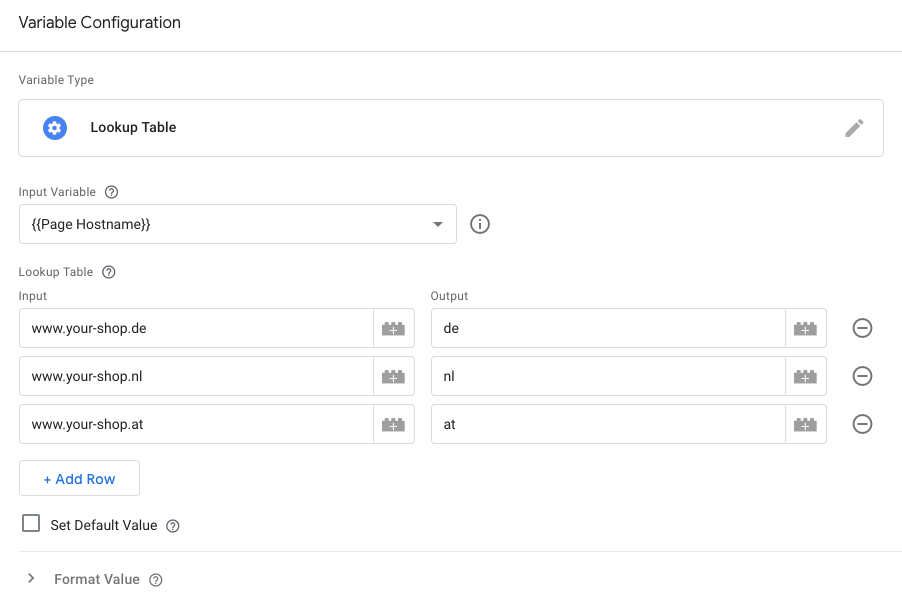
Create a new variable of the type
Lookup Tableand name itLT - moebel.de - Market. As input variable, select the built-in variablePage Hostname. -
Add one row per host name of your shops, as in the screenshot. As output, enter the market code of the portal your visitors come from.
-
Create a second
Lookup Tablevariable namedLT - moebel.de - Partner Keywith the same input variable and the same rows. Its output is the partner key you received for that market.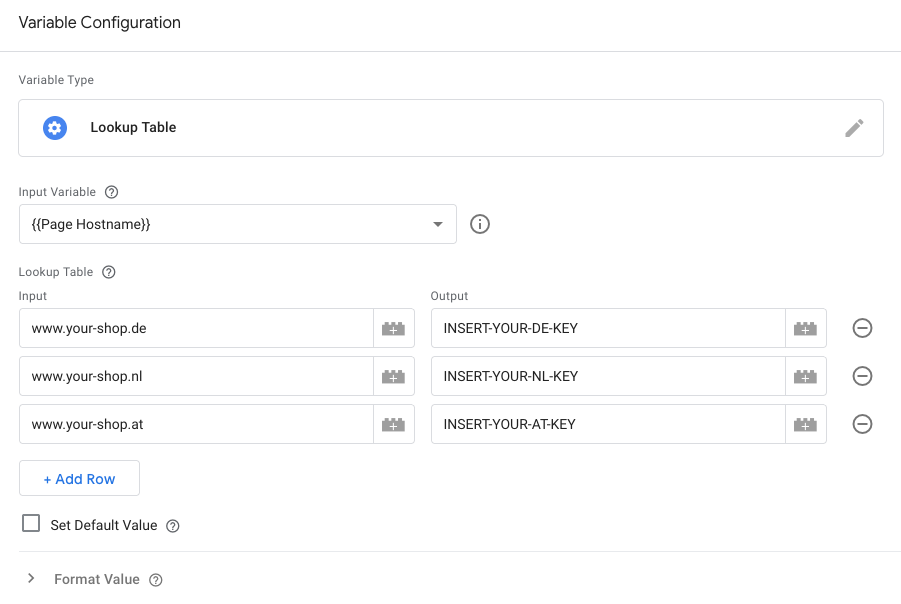
Fill both tables with the same host names. A host name without a row returns undefined, and the script then sends nothing for that shop. If a shop answers both with and without www., add a row for each.
|
2. Conversion Tag
In your Conversion tag, replace lines 3 and 4 of the conversion script with these two lines:
var PARTNER_KEY = {{LT - moebel.de - Partner Key}};
var MARKET = {{LT - moebel.de - Market}};
Then publish your container version.
| Everything else stays as in the standard setup described under Conversion: the rest of the conversion script, and the purchase trigger. |
One Shop for Several Markets
If one shop serves several of our markets under one host name, for example www.your-shop.com for moebel.de, moebel24.at and moebel24.ch, the host name cannot choose the market. How to route the sales then depends on whether the URLs of the shop carry a country code.
With a Country Code in the URL
If your container already has a variable that tells the markets apart, for example a country code from the URL, use it as input variable of the two Lookup Tables from Routing Variables instead of Page Hostname, with one row per value.
Without a Country Code
If nothing in the URL tells the markets apart, send every sale to each of these markets.
-
Create one Conversion tag per market, each with the complete conversion script. In each of them, enter that market in line 4 and the partner key you received for it in line 3.
-
Give all of them the purchase trigger from Conversion.
-
Publish your container version.
| Each sale then reaches all of these markets. Our system assigns it to the partner account the click belongs to; in the other markets it is recorded as not assignable. |